• Skip to main content
  • Skip to secondary menu
  • Skip to footer

Digital Market

seeing people behind the digits

  • Sponsored Post
  • About
  • Reports
    • Events
    • Domain Names
    • Technology
  • Contact

How to Turn a Studio Apartment Into a Home Office for Digital Nomads

October 25, 2026 By admin

Most digital nomads don’t work from beach bars. They work from a furnished studio booked for a month, with a bed, a kitchenette, a small table and a Wi-Fi password taped to the fridge. The listing called it “laptop friendly”. That usually means there’s a table.

A studio can be a good office. It’s quiet, it’s yours, and the commute is four steps. The catch is that the same twenty-odd square metres has to hold your working day, your meals and your sleep, and you can’t drill, paint or buy furniture you’ll leave behind in six weeks. So the job is to set the room up fast, using what’s already there and what fits in a suitcase.

Here’s how to do it.
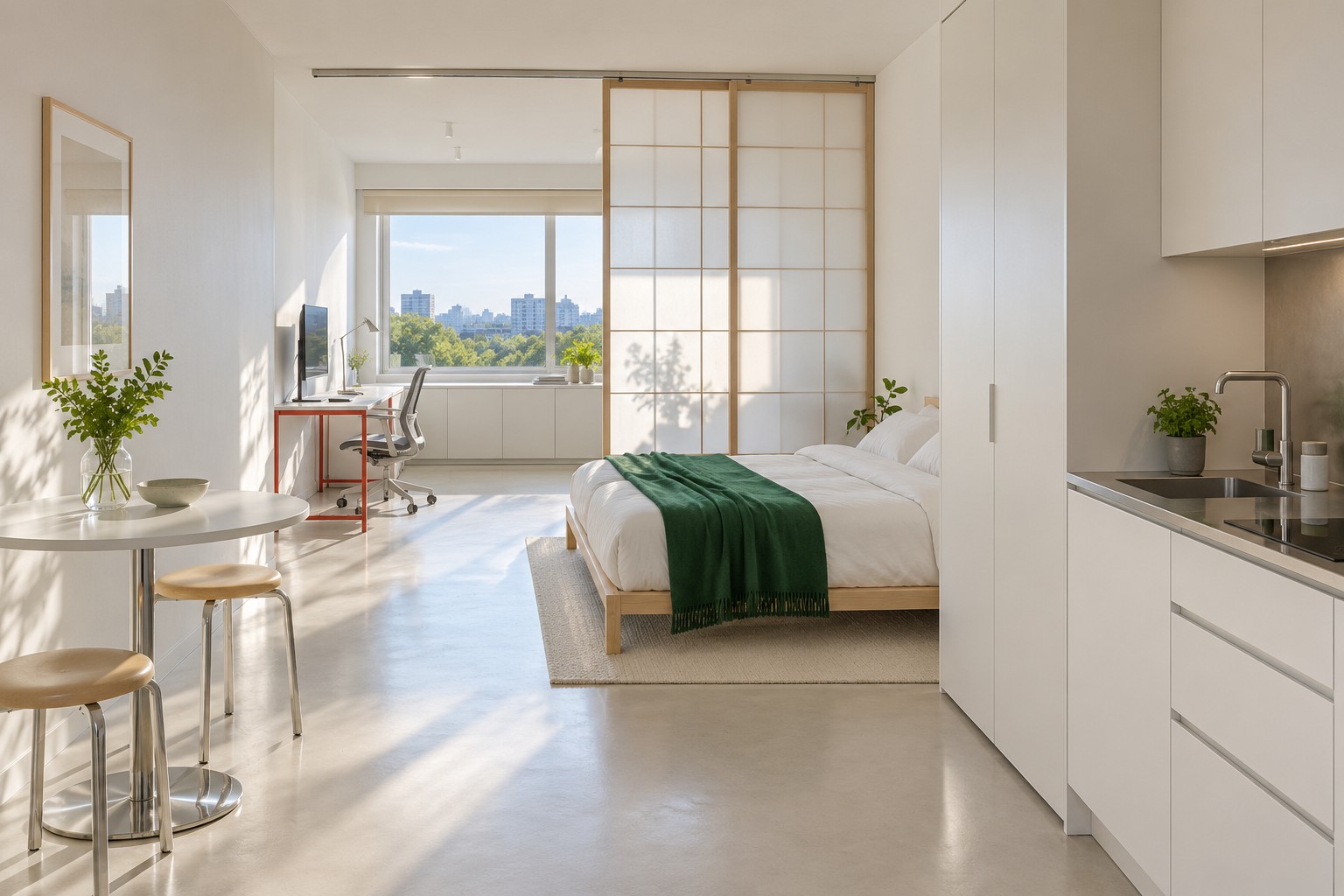
Bright studio with a white kitchenette and wardrobe on the right, a bed with an emerald throw, translucent timber-grid sliding panels and a vermilion steel desk by the window beyond.

Give Work the Window and Give Sleep the Wall

Walk the room before you unpack. The best spot for work is nearly always beside the window, because you need daylight during working hours and the bed doesn’t. Turn the table so the screen faces a wall rather than the bed. That one move does more for the evening than any divider, since a glowing laptop you can see from your pillow keeps the office open after you’ve stopped working. HomePremise.com walks through the idea in separating work and sleep in a studio apartment, including the cheap test of sitting on the bed and looking back at the desk.

Watch the glare too. A screen with a bright window right behind it, or right in front of it, will tire you out by mid-afternoon. Side light is what you want, and a home office beside the window without the screen glare shows how to angle a desk to get it.

Most rentals won’t let you put up a sliding screen or a ceiling track. A hanging curtain, a clothes rail with a sheet, or a low shelf between the bed and the work corner all do the visual job well enough, and none of them stop sound. If you take calls while someone else sleeps, that’s a scheduling problem and not a furniture one.

Make the Dining Table a Desk That Packs Away

You won’t buy a desk for a five-week stay. The dining table becomes the desk, and the trick is giving your kit a place to go at night so the table can be a table again. A small trolley, a shelf in the wardrobe or even one dedicated bag works, as long as every item has a fixed spot. The approach is laid out step by step in a studio apartment office that packs away after work, down to timing the evening clear-up so it takes a couple of minutes.

Dining tables and dining chairs aren’t built for eight hours of typing, so bring the parts that fix that. A folding laptop stand to lift the screen to eye level. A separate keyboard and mouse, so your wrists aren’t bent over the laptop. A cushion if the chair is too low. That’s the whole travel ergonomics kit, and it weighs less than a kilo. For a sense of how much surface you really need, how much desk space your work actually needs is a useful check before you start moving furniture around.

Cables are the other giveaway of a rushed setup. One extension lead with a few sockets, one charger brick for everything, and a cable run that doesn’t cross the path to the bathroom. Keep it within reach so you aren’t crawling under the table every morning, as in home office cable management you can still reach.

Plan for Time Zones and Calls

Nomads rarely work the hours of the city they’re sleeping in. A team six hours behind means calls in the evening, under a single ceiling light that makes you look grey on camera. Pack a small clip lamp or a light that can sit behind the laptop and bounce off the wall. Home office lighting after the sun goes down covers the basics: one soft light in front of you, nothing harsh above you, and nothing bright behind.

The camera also sees the room. Pick the plainest wall you have and sit with your back to it. An unmade bed or a sink full of dishes says more than you’d like, and a tidy patch of wall with one object on it reads as professional anywhere. A home office background that works for video calls explains why the wall behind you matters more than the one in front.

Test the connection on day one, at the hour you’ll actually be on calls. Building Wi-Fi often slows when everyone gets home. If the router is in the room, sit near it. If the apartment has an Ethernet port, a small USB adapter in your bag earns its place many times over.

Close the Office Every Night

The hardest part of working where you sleep isn’t the furniture. It’s stopping. Without a commute there’s nothing that marks the end of the day, so build a small ritual into the room itself. Clear the table, put the kit away, switch off the work lamp and switch on the one by the bed. It sounds trivial. After a month in a 25 square metre room, it’s the thing that keeps the place feeling like a home and not a hot desk with a mattress.

If the stay runs longer, or two of you share the studio, the same rules scale up. A studio apartment with two workstations and a studio apartment with room for a real working day show how far one room can stretch before it needs a second one.

The room doesn’t have to be big. It has to know when it’s an office.

Filed Under: News Tagged With: digital nomads, home office, remote work, studio apartment

Footer

Recent Posts

  • How to Turn a Studio Apartment Into a Home Office for Digital Nomads
  • Meltwater Uses Kim Cattrall to Sell the New Rules of Brand Intelligence
  • Not for Everyone: The Subtle Allure of Exclusive.org
  • Paper’s Bet on the Future of Design Is Really a Bet on AI-Native Software
  • Markets & AI Digest: Samsung’s Record Quarter, SK Hynix’s Nasdaq Debut, and the Memory Selloff That Won’t Quit (Early July 2026)
  • Portfolio Update: 14.8K Weekly Visits Across 65 Sites
  • Dual-Band vs Tri-Band Routers: When Is the Third Band Not Worth It?
  • Valinor Digital Raises $25 Million to Build “Open Credit” Infrastructure
  • Agentic Social Layers: Bluesky’s Attie Points to a Programmable Feed Economy
  • The Interface Between Memory and Meaning: Vector Databases and MCP in the New AI Stack

Media Partners

  • pho.tography.org
  • JVQ.net
  • 3V.org
Shooting a Bar at Night Without Losing the Atmosphere
Sports Photography: The Decisive Moment Is Not Always a Single Moment
How to Salvage an Underexposed Photograph: Three Versions of Madrid’s Palacio de Cibeles
Finding the Photo You Half Remember in a 60,000-Shot Archive
Sigma 50-120mm F2.8 DC OS Completes the APS-C Holy Trinity
Nikon Z5 IIC Review for Content Creators: Full-Frame Video for $1,400, No Viewfinder
Vintage Lenses on APS-C and Micro Four Thirds: Crop Factor, Flange Distance and Speed Booster Tables
Canon EOS R8 Mark II vs EOS R8: IBIS and a Joystick for $400 More
Can a Website With Only Original Photos Rank on Google Without Text?
OpenAI Buys Glass Imaging for Over $300M, Triple Its 2025 Valuation
How jvq Holds Up Beside a Noisy Neighbour, on a Drifting Machine and With Python Scripts
jvq Now Gates GitLab Merge Requests, With a Ready Template and a JUnit Report
jvq Now Reads criterion, Google Benchmark, pytest-benchmark and vitest as They Are, and Gates File Sizes
jvq Flags an Update Check That Made a Go Command-Line Tool Nearly Four Times Bigger
jvq Now Gates Benchmarks in Any Language, by Timing a Command or Reading a Few Lines of JSON
jvq Blocks a Go Logging Change That Added Two Allocations to Every Request
jvq Catches a Python Cleanup That Made URL Parsing Nearly Five Times Slower
jvq 0.6 Counts Instructions Under Valgrind to Catch a 2 Percent Slowdown on a Noisy Runner
jvq 0.5 Keeps a History to Catch the Slowdown That Arrives One Small Merge at a Time
How jvqq Traced a 12-Minute Payments Outage Through 3 Million Log Lines
AI Infrastructure Financing Digest October 22 2026 Shows Short Debt Funding Long Bets
CrossGov's Overlooked Federal Numbers: $13.5 Million Saved on $1 Billion, a 14% Sustain Rate and a 60-Year-Old System Still Running
Press Release Digest: Rubrik Puts Claude Mythos 5 on Code Security, Factory Hits $5 Billion, TeRAM Takes On the AI Memory Wall
Wonderful's $5B Series C: 50x Forward ARR on $154,000 of Revenue Per Employee
Nvidia (NVDA) Buys Hugging Face for $12.9B, Under the $13B Floor Hugging Face Floated Three Days Earlier
Apple's Chinese Memory Push Is a Precedent Problem for $MU and $SNDK, Not a Volume Problem
NYC Sidewalk Sheds and Local Law 11: Why the Shed Is Cheaper Than the Repair
Meta's Hyperion Data Center in Louisiana Was Negotiated With Tax Breaks and Little Public Input
Enigma Raises $70M for Human-Robot Interaction as Multiverse Raises $570M to Shrink Models
Robots.txt vs Noindex: Why Blocking Crawlers Does Not Remove Pages From Search

Media Partners

  • k4i.com
  • Referently.com
  • Press Club US
Venture Funding Digest October 22 2026 Shows Money Chasing Supply Chain Independence
Venture and M&A Digest: Valon Raises $150M at $2.3B, C.H. Robinson to Acquire RXO
Tech News Digest, October 3, 2026: Supabase Buys Turso, Broadcom's $60B AI Chip Financing, Flock Ruling, Plus Five Infrastructure Projects
Borsa Istanbul Fund Scandal: Turkey's Regulator Is Prosecuting the Collapse Its Own Rule Set Off
Fed Hikes Rates for the First Time Since 2023 and the 10-Year Treasury Yield Falls Back Below 5%
Chip Stocks Sell Off on Amodei's Pacing Call While 2026 Capex Forecasts Keep Rising
Saudi Arabia Loses Both Export Routes as the Houthis Reach Bab el-Mandeb
Micron (MU) Slips as Intel-Backed Kepler Computing Takes Aim at Memory With 2,000 Wafers to Its Name
Palantir (PLTR) Gave Back Half of a 9.1% Rally While Snowflake Kept 21%
DFEN Fell 33% in a Month While Its Index Fell Only 11%
Stirling Engines Explained From Working Gas to Useful Power
WiFi Standards Timeline: 802.11b to 802.11bn With Dates, Speeds and Bands
Six Small Infrastructure Projects: AltSql, BareProxy, KeyValueStore, Precomputing, Preconfiguration and VPN Works
Sanctions Regimes Compared: US, EU, UK and UN Rules and Who Enforces What
Post-Quantum Cryptography Explained: NIST's ML-KEM and ML-DSA Standards and Migration Deadlines
Outbound Investment Rules Explained: Treasury's Limits on US Money Into Chinese AI and Chips
Military Reporting Formats Explained: SITREP, SPOTREP, FRAGO, OPORD and SALUTE
Matter and Thread Explained: The Smart Home Standards and How They Use Your Network
CVE, CVSS and CISA KEV Explained: How Vulnerabilities Are Scored and Prioritized
Credit Spreads Explained: Investment Grade vs High Yield and What Widening Signals
CrossGov.com Gives Reporters Covering Washington a Ready Story List: Tariff Refunds, a Shrinking CISA, FEMA Denials and an IRS With No Commissioner
Why Social Unrest Has Become a Standing Condition in Europe and the United States
UN Secretary-General Race: Rodrigues Birkett Takes the Lead While Grossi Collects Discourage Votes
Eight Pulitzer Winners and Finalists Used AI in Their 2026 Work
BuzzFeed and GB News Cut a Third of Staff Each as 2026 Job Losses Pile Up
Hormuz Talks Stall, Samsung Stacks Memory on the GPU, Taiwan Slows Its Own Networks: August 10 Briefing
Trump Administration Clears Saudi Nuclear Deal Without Enrichment Safeguards
Lindsey Graham, South Carolina Senator and Foreign Policy Hawk, Dies at 71
The Case Against ICC Jurisdiction Over American Citizens
Why Trump Is Going All In to Please Erdogan

Copyright © 2022 DigitalMarket.org